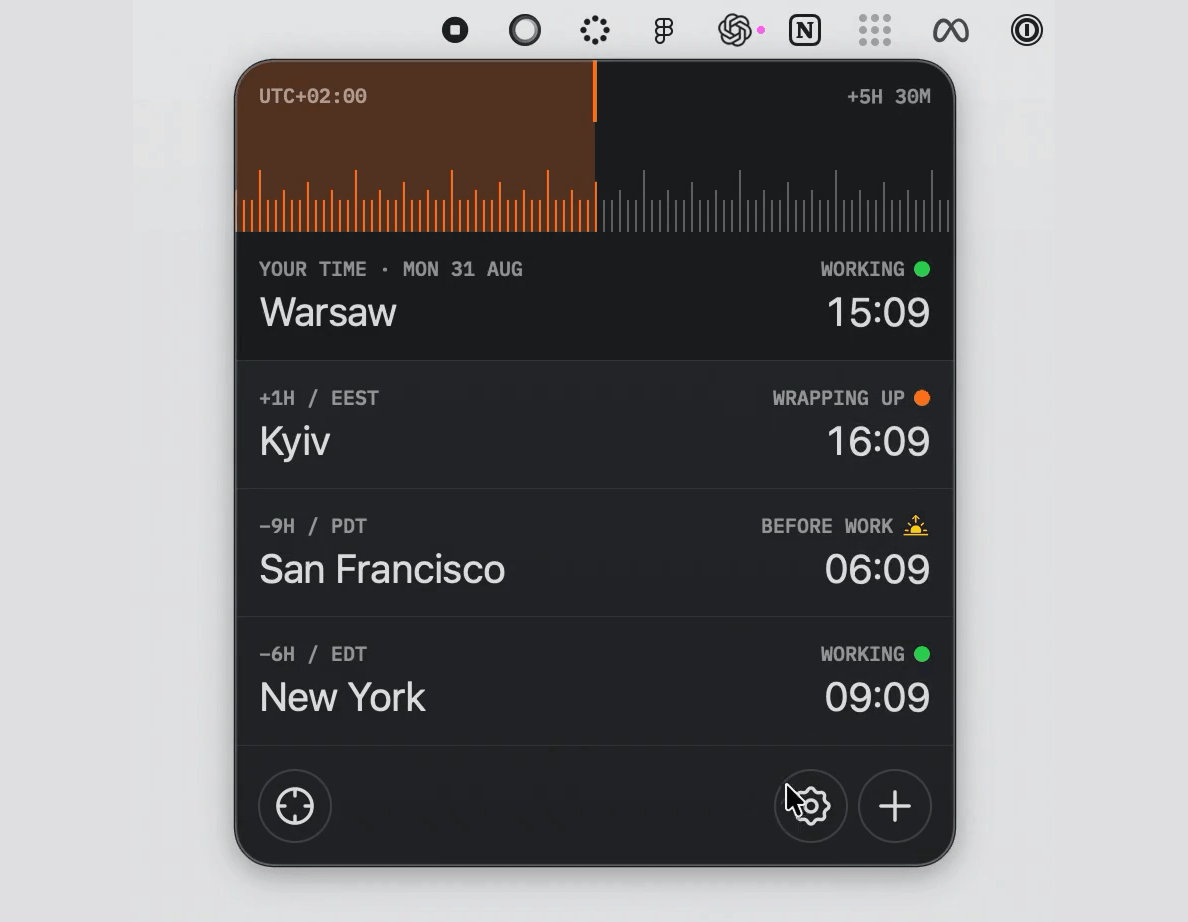
Timezones keeps your clients, teammates, and cities aligned around the same instant. Drag one tactile timeline and every tracked timezone moves with it—complete with daylight-saving changes, fractional offsets, working-hour context, and an optional quiet dial sound.
Highlights
- Lives entirely in the macOS menu bar
- Compares every saved city against one shared timeline
- Uses canonical timezone data, including DST and fractional offsets
- Shows working, wrapping-up, night, and weekend context at a glance
- Supports direct row reordering and contextual city actions
- Includes light, dark, and system appearance modes
- Offers keyboard and trackpad-friendly timeline control
- Stores preferences locally and makes no network requests
Requirements
- macOS 14 Sonoma or newer
Build from source
git clone https://github.com/taras-creates-things/Timezones.git
cd Timezones
open Timezones.xcodeproj
In Xcode, select the Timezones scheme and My Mac, then press Run. The app is menu-bar-only, so it will not appear in the Dock.
Using the timeline
- Drag the ruler or scroll horizontally over it to shift every city together.
- The orange range measures the distance between now and the selected time.
- Click the target button to animate smoothly back to the current time.
- After focusing the ruler, use Left/Right Arrow to move by 15 minutes; hold Shift to move by one hour.
- Use the plus button to add a city and the settings button to adjust appearance, time format, home timezone, launch behavior, and sound.
- Drag city rows to reorder them, or secondary-click a row to copy, edit, move, or remove it.
Privacy
All timezone calculations and preferences stay on your Mac. Timezones has no account system, analytics, advertising, or network service.
Похожие приложения
Consul
The automatic file converter for macOS. Rename to convert (yes, seriously).
TextGrabber2
Mac menu bar Copy-to-Action tool for extracting text from images using on-device OCR
Presentify
A macOS menu bar app for screen annotation, cursor highlighting, spotlight, and zoom during presentations
KeyScreen
Display keystrokes beautifully on screen for tutorials, presentations, and recordings